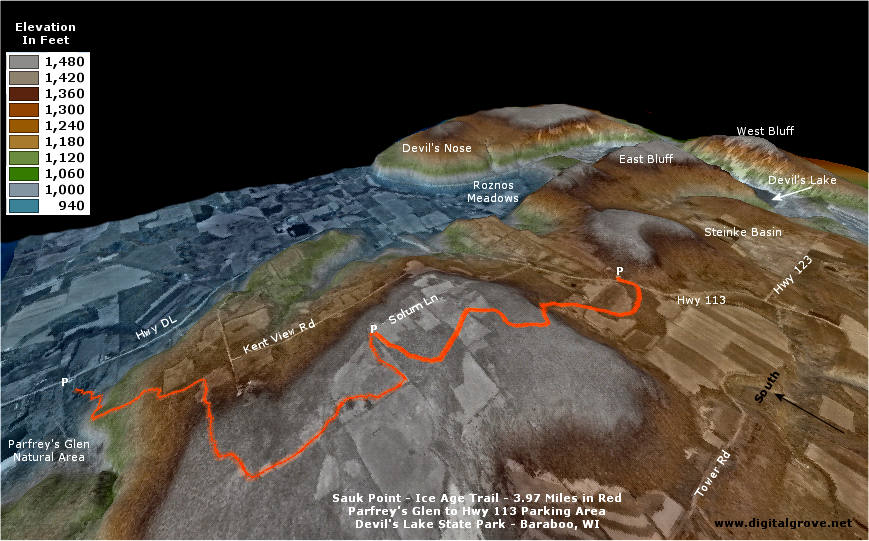
|
|
|
The free and trial mapping programs described in the Toolbox
could be all you need to make your maps. If you routinely use
maps and databases for decision making, however, you might want
to buy commercial Geographic Information System (GIS) software.
This section of Digital Grove introduces a sample of inexpensive
options.
 While
there are many fine GIS products on the market, the prices of
mainstream GIS programs are often high, running thousands of dollars.
New pacesetters, though, are challenging the establishment with
superb GIS software selling for a few hundred dollars or less
per license. GIS is becoming accessible to a broader market as
a result. While
there are many fine GIS products on the market, the prices of
mainstream GIS programs are often high, running thousands of dollars.
New pacesetters, though, are challenging the establishment with
superb GIS software selling for a few hundred dollars or less
per license. GIS is becoming accessible to a broader market as
a result.
Some commercial products take a comprehensive approach, including
nearly everything you'd need in one title. Others offer "a
la carte" GIS, selling individual components or specializing
in a particular aspect of GIS. Following are ten basic features
to look for. Does the GIS software:
· Offer
spatial data analysis and connect to external databases?
· Utilize
digital aerial photographs and other imagery?
· Import
a wide range of vector data and export products for use in other
GIS programs?
· Remove
distortions from scanned photos or maps and geo-reference the
images?
· Mix
images and vector drawings that originate in a variety of projections
and coordinate systems?
· Feature
easy-to-use drawing tools for building maps?
· Integrate
the Global Positioning System (GPS)?
· Visualize
3D terrains and surfaces?
· Provide
quality graphics for printed maps and reports or digital media?
· Have
good organization and clear, simple instructions?
The
products described on this page offer the preceding features,
with variations in specialization. The descriptions are not intended
as exhaustive reviews, but rather introductions to illustrate
a sample of the low-cost GIS alternatives that are available.
Follow the links in the descriptions for additional information.
|
|
|
|
Delorme
XMap® Product Family
($350 or more, depending
on modules)
|
|
|
|
Delorme's software
offers a tightly integrated combination of maps, trip planning
functions and GPS tools. Its XMap family is a "modular"
GIS, allowing users to focus on the elements they need without
being distracted by those they don't. Delorme data for XMap comes
ready-to-use, requiring minimal knowledge on the user's part about
projections, datums and other technicalities. The resulting XMap
system is unbeatably simple to operate.
There are a number
of products that make up the XMap family (see information about
a pending release of XMap 4.0 below). The ones
considered here include:
|
Product
|
Function
|
Cost
|
|
XMap®
3.5
|
Basic
Mapping Engine |
$99.00
|
|
- Image Registration Module
|
Needed
to import digital or scanned aerial photos or maps |
$149.95
|
|
- Export Module
|
Saves geo-referenced
images for use in other GIS programs |
$399.95
|
|
Topo
USA® 4.0
|
Includes
most of the XMap engine plus detailed vector roads/streams/boundaries
and elevation data for the entire US |
$99.95
|
|
Street
Atlas USA® 2003 Plus
|
Includes most
of the XMap engine, US vector roads/streams/boundaries
plus the ability to import geocoded database files |
$99.00
|
|
3D
TopoQuads® 2.0 (*per
state/region)
|
Includes most
of the XMap engine plus USGS digital raster graphic (DRG)
topographic maps |
$99.95*
|
|
Sat
10 Satellite Imagery (*per
state/region)
|
10-meter resolution
colorized SPOT satellite images for use in XMap 3.5 or
Topo USA |
$99.00*
|
|
|
Each of the
products listed in bold include all the map drawing features found
in the core XMap 3.5 engine. The primary difference is that
XMap 3.5 will import point/line/area shapefiles from other GIS
programs and will export DXF vector files. The shapefile import
feature makes it possible to bring in valuable information like
public land survey section lines and section corners for use in
XMap projects. Also, only the standalone version of XMap 3.5 accepts
the image registration, export and other optional modules. The
XMap 3.5 engine does not include any base maps. It must be used
in combination Topo USA or 3D TopoQuads. (A
good basic combination ― highlighted above ― would
be XMap 3.5, the Image Registration Module and Topo USA for about
$350 total.)
XMap 3.5 limits
the types of geographic data that it imports. It cannot, for example,
directly utilize DLG or SDTS vector data (but you could use a
program like Global Mapper to translate data into shapefile format
for use by XMap). Even if you have orthophotos or other digital
image files that are already geo-referenced, XMap cannot make
use of them unless you bring them in through the Image Registration
Module. XMap converts imported data into proprietary files that
can be used directly only by XMap. If you want to use your work
in other GIS programs, you can export DXF files for the vector
drawings. You would need to purchase the Export Module to save
GeoTiff or other geo-referenced image formats.
The tradeoff in
file import options is compensated by the almost effortless creation
of base maps. If you are uneasy about projections and coordinate
systems, XMap can handle those details behind the scenes if you
stick to Delorme data.
The drawing functions
for adding your information to the base maps are straightforward.
The basics can be learned in about a half-hour of experimentation
and reading. (The entire user manual is only about 150 pages.)
XMap has a basic
drawing pallet. Shown here are a few of the line choices:

Four of the tool
buttons on the left of the palette expand.
-
Create routable
roads, trails, waypoints and tracks:  .
You name the routable roads and trails and XMap adds them
to the built-in database. Waypoints or tracks that you draw
manually can be transferred to your GPS unit. .
You name the routable roads and trails and XMap adds them
to the built-in database. Waypoints or tracks that you draw
manually can be transferred to your GPS unit.
-
Draw lines,
arcs and splines: 
-
Areas, circles
and rectangles  are available in different colors (but no hatch fills).
Use these tools
 to add points, text notes or labels. XMap and each of the related
programs have an auxiliary utility for creating new point symbols.
Delorme has a selection of extra symbols
to add points, text notes or labels. XMap and each of the related
programs have an auxiliary utility for creating new point symbols.
Delorme has a selection of extra symbols  that can downloaded from their web site.
You can start
a new map object by copying a segment of an existing road, trail
or other built-in vector feature. You actually select and then
promote a copy of the base map component into a new drawing layer.
Once there, you can edit the object or use its vertices as snap
points. Drawn objects are very easy to align with the snap feature.
As you approach a control point that can be snapped to, it turns
yellow. Snap is always enabled unless you hold down the control
key.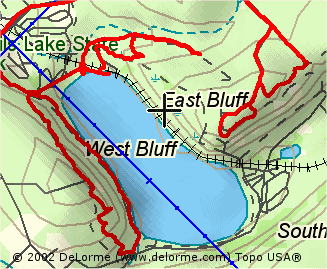 You can precisely position any of your drawing objects with latitude/longitude
and bearing/distance placement controls as well.
You can precisely position any of your drawing objects with latitude/longitude
and bearing/distance placement controls as well.
If you own a laptop
PC and a GPS unit, the XMap programs have moving map features
so you can track your position in real time. The programs provide
audible guidance if you are following a planned route. You can
use XMap to manage your waypoint, route and track files and transfer
data to and from most GPS units. Your GPS data is displayed in
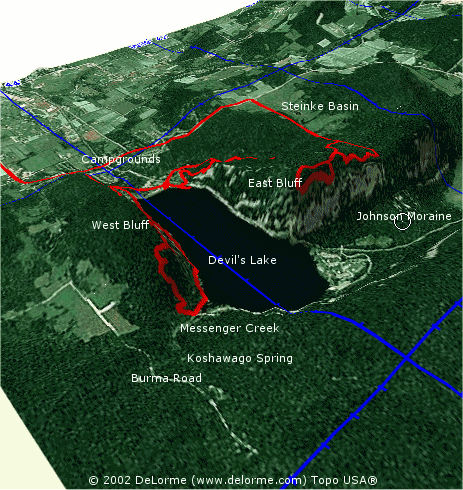
either 2D or 3D drawing layers. The 3D image to the right shows
tracks (in red) of a couple hikes at Wisconsin's Devil's Lake
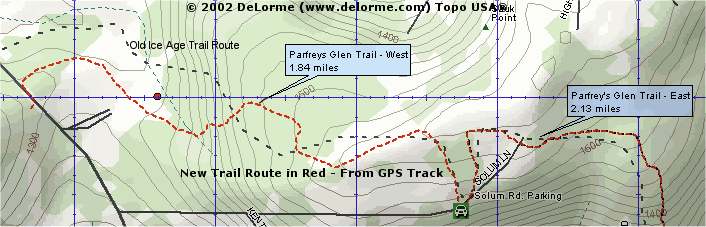
State Park. The map at the top of this section
shows the path of a re-routed Parfrey's Glen - Ice Age Trail at
the park in red, established with a GPS track and waypoints (the
old trail is in black).
Sat 10 images
(10-meter resolution SPOT satellite pictures) are available for
XMap and Topo USA at about $100 per state/region. Click the
map on the right to see a 2D Sat
10 example with the GPS track overlay. The images are
clear to about a 13 zoom factor. Any closer, and you might need
a higher resolution image.
Topo USA comes
with a free ~40 square mile download of a Sat 10 image of your
choosing through XMap's NetLink tool. When you draw on a Sat 10
image, the object appears automatically on the colored base map
in a split-screen window. That makes it easy to trace features
from the satellite image to the base map. Delorme might offer
higher resolution photos in the future through NetLink.
Another helpful
feature of XMap (Topo USA in particular) is the profile tool.
Draw a line on the map, select it, and then choose the Profile
Tab. You'll see the elevations along the line:

If you would like
access to a geocoded US telephone database ($50 more) or have
your own point data (with latitude/longitude coordinates, zip
codes or street addresses), then Street Atlas USA 2003 Plus is
the ticket. With the optional telephone number data set, you could
(for example) search to find everyone who lives within a given
radius of a fixed point or within a certain block. You can utilize
US census data in searches. You can also link other files such
as photographs or URL's to map points.
Even if you work
with a comprehensive GIS like Manifold or ArcView, you'll probably
at least want Topo USA 4.0 on your desktop. It's a superb complementary
mapping program, quickly enabling you to scope out fieldwork sites
or to view your GPS tracks and waypoints.
Visit Delorme
to discover more or to purchase the products. The user
manuals for all the Delorme XMap products are available for
download.
Note: Delorme announced the release of
XMap 4 in late February 2003. Based on the promotional material,
it will include a database import wizard, data mapping and document
linking functions similar to those offered in Street Atlas USA
Plus. Delorme will be expanding the option to purchase custom,
downloadable map data packets that include USGS DOQQ, DRG, DEM,
and Sat 10 satellite imagery. The price of XMap 4 will be $199.
Image registration and export modules will be continued as add-ons.
|
Map Maker Pro ($330)
|

Map Maker Pro 3.5
is an outstanding, forestry friendly GIS program. The system is
uncomplicated and well tailored to making resource management
maps or analyzing spatial data. A description of the Gratis version
of Map Maker is available in Digital
Grove's Toolbox.
You might wonder, "Do
I really need the Pro version?" since Map Maker Gratis is
available free. If you are a casual GIS user making a limited
number of maps with a well-defined set of photos and vector data,
Gratis is an able map creation tool (and certainly a generous
gift). If, however, you are a professional resource manager routinely
creating maps, analyzing spatial databases, integrating GPS, combining
images and vector layers from many sources or doing other complex
GIS tasks, then Map Maker Pro would be a sensible choice.
A partial list of features
above and beyond those offered in Map Maker Gratis include:
Map Creation
• Single-click flood-fill vector polygon creation
• Raster and vector rubber sheeting
• Create buffer zones around collections of objects
• Trim raster and vector to polygons
• "Spaghetti processing", - lines to polygons
• Intersections and unions from overlapping polygons
• Powerful data tidying routines
• Raster to vector
• Rubber sheeting of vector and raster data |
Map Projections/Coordinate
Systems
• UTM, OS Grid, Lambert’s Conic, and user-defined Transverse
Mercator and Conic projections
• 225 pre-defined datums, limitless user definable datums
and ellipsoids
|
GPS Tools
• Live data capture (NMEA and Garmin)
• Download waypoints and tracks
• Live tracking of moving points
• Ortho-rectify aerial photography using GPS control points
|
Data Export
• Export SHP, MIF, DXF etc
• Export BMP, JPG, TIF, Geo-Tiff, and ECW images |
Spatial Data
Analysis
• Use data from Microsoft Access, Excel, or dBase files
to make thematic maps
• Generate legends automatically
• Link data queries seamlessly to Microsoft Access forms
or Lotus Approach Forms
• Complex spatial queries
|
3D Mapping
• Create surfaces, perspective views, elevation profiles
and contours; calculate volumes and many more functions
|
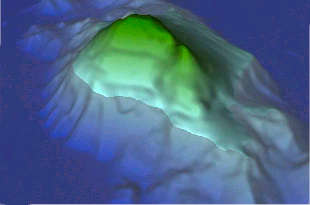 For
additional information, visit the
Map Maker North America site for a tour of the product. Click
the image to the left to see a gallery of 2D and 3D maps produced
by Map Maker Pro. The 3D gallery at Map Maker includes a few
intriguing annimations. For
additional information, visit the
Map Maker North America site for a tour of the product. Click
the image to the left to see a gallery of 2D and 3D maps produced
by Map Maker Pro. The 3D gallery at Map Maker includes a few
intriguing annimations.
Try Map Maker Pro yourself.
It's available as a free 30-day trial. The 257 page Pro manual
and 72 page 3D manual are excellent guides. Download the program
and documentation from
Map Maker North America or Map
Maker UK.
(Copyrighted 3D image used courtesy of Map Maker
North America LTD)
|
|
Manifold
System 5.5 Professional® ($245)
|
|
 Manifold
System 5.5 is a full-featured, industrial strength Geographic
Information System. Manifold imports most image and vector data
and has exceptional drawing tools, resulting in accurate and attractive
maps. It lets you incorporate the scanned aerial photos and paper
maps in your archives with intuitive image rectification and geo-referencing
features. The program's image editing capabilities rival dedicated
programs like PhotoShop®. You'll also be able to dig into spatial
data with a powerful SQL database engine. Manifold
System 5.5 is a full-featured, industrial strength Geographic
Information System. Manifold imports most image and vector data
and has exceptional drawing tools, resulting in accurate and attractive
maps. It lets you incorporate the scanned aerial photos and paper
maps in your archives with intuitive image rectification and geo-referencing
features. The program's image editing capabilities rival dedicated
programs like PhotoShop®. You'll also be able to dig into spatial
data with a powerful SQL database engine.
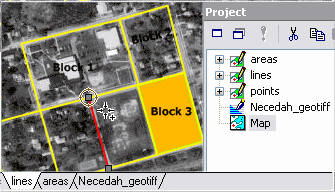 Manifold
utilizes simple, project-based organization. You first open, import
or create layers in the right project window. Click and drag elements
from the project window into a map pane on the left to compose
a map view. Tabs at the bottom of the view show which elements
are active. You can also edit a particular project layer in isolation
by double clicking on it. Manifold works with over 80 different
file types, and so you can exploit mapping information from almost
any source. Manifold
utilizes simple, project-based organization. You first open, import
or create layers in the right project window. Click and drag elements
from the project window into a map pane on the left to compose
a map view. Tabs at the bottom of the view show which elements
are active. You can also edit a particular project layer in isolation
by double clicking on it. Manifold works with over 80 different
file types, and so you can exploit mapping information from almost
any source.
Manifold Professional
Edition's basic approach to project storage is to combine all
the elements including imported vector, raster and tabular data
along with new layers you create into one container file saved
with a "map" extension. The container file approach
has its benefits, keeping all the parts of a project together.
That makes it easy to move work between computers. The project-based
approach also lets you define as many views (maps) as you like,
combining and mixing the elements of the project. Each map view
takes very little space in itself, but the container file approach
can result in duplication of data on your hard drive. The alternative
is to have Manifold link to files left on their DBMS servers,
allowing unlimited-sized projects. The Enterprise Edition of Manifold
(only $395) offers additional file linking options.
Manifold is built
around a SQL engine as powerful as other standalone database programs
that cost twice as much. If you are a professional resource manager,
your organization probably has a wealth of inventory or reconnaissance
data from decades of fieldwork. Manifold can easily bring that
data into a project, link it to areas on maps and help you look
at it in new ways. You can also employ Manifold's SQL engine to
independently analyze data without any map associations.
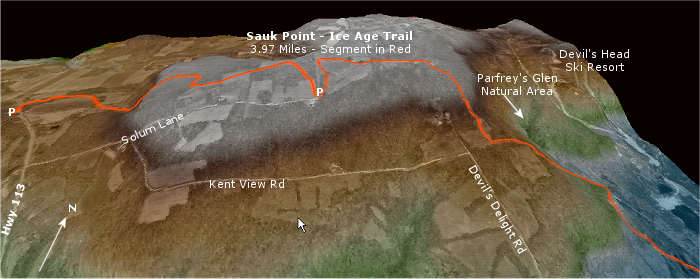
 The
3D surface visualization capabilities in Manifold are impressive.
Click the image on the left for a sample combining a USGS DEM
and a 2D gray scale orthophoto. Manifold will also overlay vector
data on the 3D surface as shown in the trail map above. (Click
the image for a larger view to the southwest. The trail in red
is a GPS track saved as a shapefile in OziExplorer and imported
into Manifold. This is the same trail shown at the top of the
Delorme XMap section.) If you intend
to do much 3D visualization, get a GeForce4 64MB or larger 3D
graphics processor for your PC. With a graphics accelerator,
you "fly" effortlessly over your terrain even at full
resolution. The
3D surface visualization capabilities in Manifold are impressive.
Click the image on the left for a sample combining a USGS DEM
and a 2D gray scale orthophoto. Manifold will also overlay vector
data on the 3D surface as shown in the trail map above. (Click
the image for a larger view to the southwest. The trail in red
is a GPS track saved as a shapefile in OziExplorer and imported
into Manifold. This is the same trail shown at the top of the
Delorme XMap section.) If you intend
to do much 3D visualization, get a GeForce4 64MB or larger 3D
graphics processor for your PC. With a graphics accelerator,
you "fly" effortlessly over your terrain even at full
resolution.
With the prevalence
of MrSID® format imagery from many natural resource agencies,
you might wonder about the absence of direct support for compressed
MrSID imagery in Manifold. It's definitely not for lack of technical
know-how. Manifold apparently has concerns about the proprietary
nature of the MrSID format and has instead opted to focus on alternatives
like ECW compression. Although somewhat inconvenient, you must
first extract an area of interest as a GeoTIFF file with a separate
utility like MrSID GeoViewer
in order to use MrSID data with Manifold. (The same limitation
regarding MrSID imagery also applies to XMap and Map Maker.)
Can you teach
yourself to use Manifold? Yes, but the experience can be taxing
at times considering Manifold's sophisticated capabilities. The
online manual is extensive at 3,000+ pages. You don't need to
read (or print) the whole thing, though, to get going. There is
a good selection of examples to follow. A concise quick-start
guide that could be conveniently printed and more online training
tutorials would, however, be desirable additions.
If you do not
need the power tools offered by Manifold, you might want
to consider very capable but easier to learn programs like MapMaker
Pro or Delorme XMap. In my experience, Manifold is
the most complex of the three. MapMaker is intermediate, while
XMap is the simplest to learn. Manifold is also the most demanding
of system resources of the three GIS programs listed here. Be
sure to compare your computer assets to
system requirements before making a purchase.
The fabulous $245
Manifold price includes two incidents of free technical support.
Additional support can be purchased if needed at the Manifold
online store. Another source of help is the
Manifold discussion list hosted by Directions Magazine.
In addition to finding answers to questions, many of the list
users post helpful procedures, scripts and tips.
To learn more
about Manifold, see the
review written by Paul Amos featured at Directions Magazine.
The entire
Manifold user manual and a complete product description are
also available on the Internet. There is no trial version of Manifold
System 5, but the company gives a 30-day money back guarantee.
(Initially, the program runs for up to 30 days with an included
serial number. As long as you do not download a registration key
in that time, you can return the product. Manifold is confident,
for good reason, that you will not be making a return.)
Useful Manifold 5.5 Links:
http://www.manifold.net/products/mfd50pro/55_highlights.html
For a comparison between the
Manifold 5.50-geocoder combination ($50 extra) and a competitor's
$9,000 product see:
http://www.manifold.net/products/geocoder/geocoder_comp_home.html
As a final
note, even if you use GIS programs like those above, you will
find many stand-alone mapping programs to be invaluable. Commercial,
registered versions of products described in the Mapping
Toolbox are first-rate. You would also not want to be without
many of the free software titles included there.
|
|
Top
/ Home
/ About
The
Manifold logo is used with permission of CDA International Ltd.
Map Maker™ logo used with permission of Map Maker LTD.
|
|
|