|
If
you work with geographic data from many sources, then Global
Mapper is an essential instrument that can effortlessly
access and align information "on the fly".
Global Mapper is the GIS equivalent of the Rosetta Stone.
It not only can bring in a babble of data from different
coordinate systems and file formats, but also clip and export
files in hundreds of different ways according to your needs.
When
the program developer chose the name "Global",
his objective went beyond finesse with a myriad of data
types. He succeeds in pulling together functions that address
almost every GIS need*. With Global
Mapper you can:
-
Convert
files individually or by batch, addressing entire directories
at one time if desired
-
View
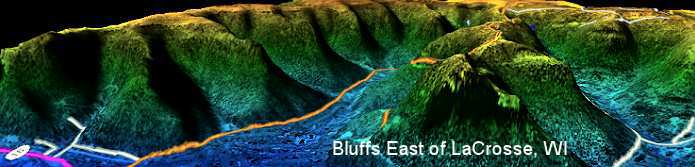
all data layers in 3D when a Digital Elevation Model
is loaded. Easily rotate through hillshade options,
either from a top-down perspective or freely positioned
oblique views.
-
Georeference
imagery to a coordinate system using 1st order polynomial
and Delaunay triangulation
(piecewise affine) methods.
-
Digitize
point, line and area objects or edit existing vector
shapes. Measure distances and areas.
-
Track
GPS positions in real time.
-
Calculate
line of sight and cut-and-fill volume.
-
Grid
3D point data.
-
Script
repetitive tasks.
-
Do
even more as detailed below...
Global
Mapper includes the ability to directly access the entire
TerraServer database of USGS satellite imagery and topographic
maps free of charge. When you are connected to the Internet,
that means you can load a vector file for an area anywhere
in the US and within seconds add an orthophoto or topo map
overlay. Global Mapper can also access downloadable data
from other servers around the world.
Perhaps
one of Global Mapper's strongest hands is user support.
Its Yahoo forum is active with prompt replies to even the
most esoteric technical questions.
Download
the free trial and experiment with most functions. The trial
is not time limited and allows you to load up to four data
layers at a time. Line-of-sight, advanced 3D, printing,
exporting and some other functions are not available until
the program is registered.
|
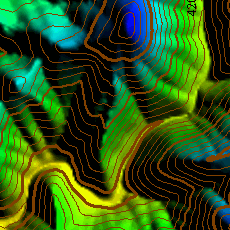
Generate
Contours
|
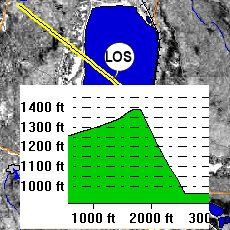
Line-of-Sight
Profile
|
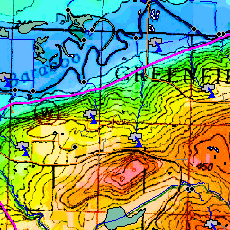
Transparency
and Blending
|
|
|
|
|
|
Quick
Summary of Global Mapper Features
- Supports viewing of dozens of the most common data
formats, including DLG-O, DRG, DOQ, DEM, DGN, DXF,
SDTS DLG, SDTS DEM, ECW, MrSID, ESRI Shapefiles, E00,
MapInfo MIF/MID, MapInfo TAB/MAP, GTOPO30, TerrainBase,
SRTM, ETOPO2, ENVI DEM, JPG, PNG, BIL, BSQ, BIP, XYZ,
Tiger/Line, Arc Vector Coverages, VPF (VMAP, DNC), S-57,
ADRG, ASRP, CADRG, CIB, JPEG2000, GIF, NOS/GEO, Garmin
PCX5, GPX (GPS eXchange Format), OziExplorer WPT/PLT,
ASTER DEM (HDF and GeoTIFF formats), ASTER L1A/L1B imagery,
Zmap Plus Grids, LIDAR LAS, Marplot MIE, DHM (Swiss DEM),
MODIS imagery, NTF Grids, etc.
- Provides direct access to the complete TerraServer
satellite imagery and topographic map archive for the
entire US.
- Supports true 3D viewing of loaded elevation
data including draping of any loaded imagery and vector
data over the 3D surface. Vertical and perspective 3D
views.
- Crop, reproject, and merge any combination of
raster data and elevation data, including DRGs. You can
also crop data to an area feature.
- DIGITIZING SUPPORT. You can digitize new vector
(area, line, and point) features by drawing them with
the mouse. You can also edit existing vector features.
Newly created and editing features can be saved to any
of the supported export formats. In addition, shapes like
rectangles, circles, ellipses, arcs, and concentric range
rings. can be easily drawn as well.
- GPS SUPPORT. You can track a compatible GPS device
connected to your computer's serial port or USB port in
real-time over any loaded data. In addition, you can mark
waypoints at the current GPS location and record a tracklog
of where your GPS device has been while connected, all
seamless with your loaded map data!
- EXPORT SUPPORT. You can export both vector, raster,
and elevation data to a variety of formats (see below).
You can merge any combination of data sets, regardless
of source scale, type, and projection. You can also breakup
your data into a regularly spaced grid on export if you'd
like as well. Here is a partial list of supported export
types.
- Vector Data (i.e. DLGs, Shapefiles, DXF, etc.)
- Arc Ungenerate format
- AutoCAD DXF format
- CDF format
- CSV format
- ESRI Shapefile format
- Garmin PCX5 TRK and WPT formats
- GPX (GPS eXchange Format)
- InRoads ASCII format
- Landmark Graphics format
- MapGen format
- MapInfo MIF/MID format
- MatLab format
- MOSS format
- NIMA ASC format
- PLS CADD XYZ Grid file format
- Simple ASCII Text format
- Surfer BLN format
- SVG (Scalable Vector Graphic) format
- Tsunami OVR format
- USGS DLG-O format
- Raster Data (i.e. DRGs, DOQs, etc.)
- BIL/BIP/BSQ formats
- ECW format
- GeoTIFF format
- JPG format
- Elevation Data (i.e. DEMs, etc.)
- Arc ASCII Grid format
- BIL format
- BT (Binary Terrain) format
- DXF (3D-point, 3D-mesh, and 3D-face) formats
- Float/Grid file format
- Geosoft Grid format
- GeoTIFF DEM format
- Gravsoft Grid format
- Leveller Heightfield file format
- MapMaker Terrain file format
- PLS CADD XYZ Grid file format
- RockWorks Grid format
- STL format
- Surfer Grid (ASCII and binary) formats
- Terragen Terrain file format
- USGS DEM format
- VRML format
- XYZ ASCII Grid format
- Zmap Plus Grid format
- IMAGE RECTIFICATION. You
can graphically rectify (georeference) any JPG, TIFF,
or PNG image and save the results to a new fully georeferenced
image. Vector data can also have a rectification process
applied to it after loading to allow morphing vector data
to fit other data sets. Global Mapper provides
a choice of 1st order polynomial and Delaunay triangulation
(piecewise affine) methods.
- CONTOUR GENERATION. You can create contours for
any combination of elevation data. You can also specify
the contour interval to use. The generated contour data
can then be exported to any of the supported vector export
formats (see previous item for a list).
- Automatic triangulation and gridding of 3D point
data sets, such as ASCII XYZ files. This allows you
to convert a set of elevation samples into a fully gridded
data set, which can then be used for contour generation,
line of sight analysis, and view shed analysis, among
other things. The data can also be exported to any of
the supported elevation grid formats, such as USGS DEM.
- Advanced screen capture. You can capture the contents
of the screen to a BMP, JPG, PNG, or (Geo)TIFF file of
user-specified resolution.
- Batch conversion of almost any input data data
files to any compatible export type.
- Auto-clip collar for DRGs. You can now have the
collar of USGS DRG files automatically clipped off. This
allows you to seamlessly view a collection of adjacent
DRG files.
- Supports opening SDTS DLG, SDTS DEM, and most other
file types directly from .tar.gz and .zip archives. This
saves the major headache of decompressing each SDTS transfer
into a separate directory.
- Comprehensive view shed analysis using loaded
elevation grid data from a user-specified location, transmitter
height, and radius.
- 3D Path Profiling and Line of Sight (LOS) capabilities,
including receiver/transmitter heights, minimum clearance,
and earth curvature options.
- Advanced measurement capabilities, including
multi-segment path lengths and headings, enclosed area,
and cut-and-fill volume calculations either along a path
or within an enclosed area.
- Ability to link vector feature attributes to web
sites or files.
- Support the latest DEM and SDTS DEM formats, including
decimeter DEMs.
- Supports opening DLG-O and DEM files directly from gzipped
archives. This means that you can save space and hassle
by not having to decompress the data after you download
it.
- Slide over text. When you move your cursor around the
screen you'll get a description of the nearest feature
automatically displayed in the status bar.
- Supports keyboard navigation. You can pan about with
the arrow keys and zoom in/out with the page up/page down
keys.
- Search and edit load vector data by name, attribute
value, or description.
- And much more!
|
*Note Regarding Global Mapper
Functions: Global Mapper is optimized for accessing, viewing
and converting spatial data. It also performs other functions
like 3D viewing very well. Global Mapper, however, is not optimized
for digitizing, editing object attributes, attribute queries or
spatial analysis of data. For best results, combine the features
of Global Mapper with a dedicated Geographic Information System
like the TatukGIS Editor. If
you need more precision to rectify and georeference images, consider
the TatukGIS Aerial Imagery Corrector
(AIC). The TatukGIS AIC gives 2nd and 3rd order polynomial
rectification, image mosaic functions and SQL image storage solutions
needed for more advanced photogrammetry.
|