|
Download
the TatukGIS
Editor (TRIAL VERSION)
This
desktop GIS Editor supports all of the features of the free TatukGIS
Viewer, plus a comprehensive set of features to create, edit,
and analyze GIS map files or projects. The Editor opens most GIS/CAD
and raster image file types and most ArcView®, ArcExplorer®,
and MapInfo Professional® projects and can convert and save
data to a choice of common file types. Because all file formats
are supported “natively”, with no need to convert to/from
any internal format, the TatukGIS Editor is compatible with other
GIS software products which an organization may already use.
Besides
the reasonable license price, the Editor is intuitive and easy
to use, significantly reducing the need for expensive training.
The Editor can be learned from the tutorials and help files that
are accessible under the program’s Help menu. The user interface
is provided with 15 language options.
Although
the Editor is most typically used as a stand-alone desktop application,
it can also be configured to work with SQL geodatabase layers
running on almost any SQL database server product to support multi-user
access and editing of the same map files via a network. The Editor
presently supports the reading/writing of data to three SQL database
layer formats. Support for Oracle Spatial will be added in the
future.
The
Editor includes advanced functionality to build line and polygon
topology and to systematically identify and correct topology errors
in vector map data.
A
free trial version is available.
Editing Features:
* Edit already existing vector file geometry and save to the SHP,
MID/MIF, DXF, GML, DLG, KML, and GPX formats or to three SQL geodatabase
formats: i) OPENGIS® Simple Features for SQL Implementation,
ii) native TatukGIS SQL binary method, and iii)Geomedia® SQL
Server & Access Warehouse.
* Create/edit new shapes or map layers by mouse clicking on the
map or by entering/changing x,y coordinate values
* Create new vector shapes by importing x,y coordinates from an
outside source
* Snap to the locations of already existing vertices
* Create and edit shapefile attribute information via the data
panel
* Export/import vector map attribute data to/from a spreadsheet
or database
* Create/edit new shapes by entering distance/bearing measurements,
as used with RE parcel records in North America
* Special drawing tools: rectangle, rotated rectangle, quadrilateral,
circle, right angle, freehand drawing
* Line smoothing mode using B-Splines
* Special clipboard layer (copy, paste, save, unions, subtractions,
etc.)
* Unions and splitting of vector shapes
* Merger of shapefile layers (files)
* Create buffers and convex hulls and use to perform spatial selections
* Export shapefile data to supported vector map formats; Refine
the export operation using spatial extent, spatial selection,
and/or SQL attribute query
* Vector clipping based on the view extent
* Import/export data between a map layer and GPS devices in the
GPX format
* Concurrent multi-user editing of the same file using SQL server
based formats
* Build polygon and polyline topology layers and use to systematically
identify and correct geometrical errors in vector map data
* Program user interface can be localized to the following languages:
English, German, Spanish, Portuguese, French, Italian, Greek,
Swedish, Polish, Czech, Hungarian, Russian, Ukrainian, Thai, and
Japanese.
Viewing
Features:
* Open/read most vector, image, and SQL geodatabase data formats;
support is native, with no need to import data into any internal
format
* Open the attribute information of any vector map layer as a
table in the data panel; perform advanced queries and filters
against attribute values
* Use map layers containing multiple file types in the same project
* Open most ESRI ArcView®, ArcExplorer®, and MapInfo Professional®
projects as well as TatukGIS project files
* Create or edit TatukGIS project files
* Zoom in/out, pan
* Scale bar and user defined scale for viewing/printing
* Add, remove, and reorder layers in a project; unlimited number
of layers
* Alter the appearance (colors, styles, fills, outlines, symbols,
transparency, etc.) of vector layers with the use of "style
sheets"
* Manipulate pixel layers (brightness, transparency, histograms,
etc.)
* Custom render thematic maps based on vector attribute fields,
including colored-gradient value themes
* Color render Digital Terrain Model (DTM) data with directional
light and shadowing
* Custom label fonts, sizes, colors, positions, etc.
* Custom render map geometry, labels, charts, etc. based on zoom
(scale) level
* Use CGM and TrueType symbols for points and lines; CGM, TrueType,
and WMF symbols for fills
* URL Hotlink for automatic linking objects to any document referenced
with a valid URL (web page, file, even mailto)
* Present data as bar and pie charts
* Spatial querying (by point, line, circle, rectangle, polygon,
and custom clipboard layer)
* Advanced attribute data presentation, querying, and selection
with the data panel; SQL query builder
* Measurement tools for distance, area, and perimeter
* Print and print preview, print to PDF file
* Copy visible extent of all layers to Windows clipboard using
the EMF meta format
* Export to image files: TIFF/GeoTIFF/LZW, JPEG, PNG, BMP, PixelStore,
PDF
* "Internet Server Wizard" to easily set up a simple
ASP.NET project for web publishing with the TatukGIS Internet
Server. This provides an easy and affordable path to web publish
any GIS mapping project. Click here to see a sample that was prepared
with the free Viewer and web published with the TatukGIS Internet
Server LITE edition.
Screen
shots from TatukGIS Editor:
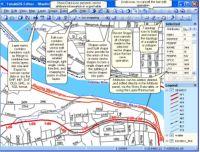 Click to enlarge; ;
The most important menu controls specific to editing functionality.
Click to enlarge; ;
The most important menu controls specific to editing functionality.
|
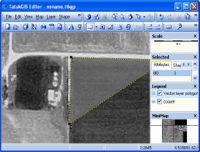 Click to enlarge; Digitizing
a new vector layer from a MrSID format orthorectified aerial
image
Click to enlarge; Digitizing
a new vector layer from a MrSID format orthorectified aerial
image
|
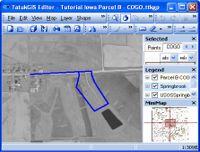 Click to enlarge; Plotting
of a land parcel based on the survey description from courthouse
land deed record.
Click to enlarge; Plotting
of a land parcel based on the survey description from courthouse
land deed record.
|
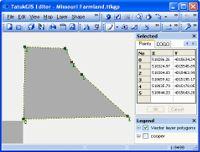 Click to enlarge; X,Y
coordinate presentation for each vertex forming the selected
polygon.
Click to enlarge; X,Y
coordinate presentation for each vertex forming the selected
polygon.
|
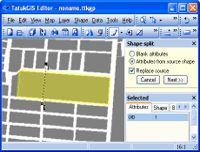 Click to enlarge; A
cutting line is used to split a polygon into two polygons
Click to enlarge; A
cutting line is used to split a polygon into two polygons
|
 Click to enlarge; Use
of a river buffer to perform a selection on a polygon layer.
Attributes of the selected polygons are presented in the data
table for further processing or editing.
Click to enlarge; Use
of a river buffer to perform a selection on a polygon layer.
Attributes of the selected polygons are presented in the data
table for further processing or editing.
|
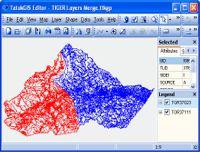 Click to enlarge; The
merging of two TIGER line layers into a single file.
Click to enlarge; The
merging of two TIGER line layers into a single file.
|
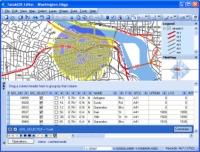 Click to enlarge;
Spatial selection with a drawn circle. The attribute information
for the selected streets is presented in the data panel for
further processing or editing. A total of 467 streets are
selected from a layer containing 27,922 streets.
Click to enlarge;
Spatial selection with a drawn circle. The attribute information
for the selected streets is presented in the data panel for
further processing or editing. A total of 467 streets are
selected from a layer containing 27,922 streets.
|
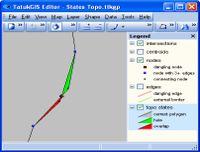 Click to enlarge; The
results of a topology build identifies holes and overlap errors
in a polygon layer
Click to enlarge; The
results of a topology build identifies holes and overlap errors
in a polygon layer
|
Return
to Toolbox
|