|
|
|
Freeware or Shareware
(SW)
GPS utilities recommended but not sold here.
|
|
|
The Minnesota DNR Garmin Tool 5.0 is a must-have
GPS utility for those using Garmin GPS receivers. As
a standalone program:
|
Download
waypoints, tracks, and routes from Garmin
GPS. Save as text files, ESRI shapefiles or
dBase IV files. Capture GPS screens as graphics.
|
|
Upload
waypoints, tracks, and routes to Garmin GPS.
|
|
Perform
real-time GPS tracking.
|
|
Convert
point shapefiles to GPS waypoints or convert
line and polygon shapefiles to Garmin GPS
tracks.
|
|
Convert
point themes to lines or polygons.
|
When used
as an ArcView® Extension, DNR Garmin Tool does even
more with theme attributes, measurements, real time
tracking, etc. Note, however, that ArcView® is not
required to use most of the features in DNR Garmin Tool.
See complete documentation
at the Minnesota DNR site.
DNR Garmin
Tool can also reproject data between coordinate systems,
or it can automatically convert GPS lat/lon data to
a projection of your choice. For Wisconsin, the WTM
parameters to use in DNR Garmin Tool can be downloaded
here (Iron County Forestry site).
|
|
|
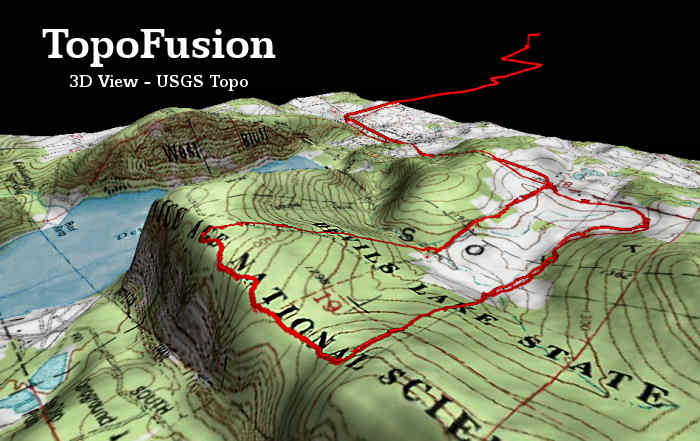
 TopoFusion™
delivers a versatile combination of GPS mapping tools
for North American users with broadband Internet service.
Unquestionably, TopoFusion is the my favorite commercial
GPS utility in terms of functions and value. It's also
a terrific 3D map browser independent of GPS. TopoFusion™
delivers a versatile combination of GPS mapping tools
for North American users with broadband Internet service.
Unquestionably, TopoFusion is the my favorite commercial
GPS utility in terms of functions and value. It's also
a terrific 3D map browser independent of GPS.
The software
connects to Garmin and Magellan receivers to download
or upload tracks and waypoints. Aerial photos and topographic
maps are retrieved from TerraServer, over which TopoFusion
displays GPS tracks in colored hues indicating elevations
of the path (see a track
map and elevation profile here). Aerial photos and
USGS topographic maps may be blended as shown below.
Tracks can be averaged, merged or cut apart and trail
networks created. You can draw tracks or waypoints on
maps and upload them to your GPS receiver. The PhotoFusion™
feature builds interactive pages linking the map and
photographs taken along a path by correlating the time
stamps of photos to those of the track points (an outstanding
tool for anyone who takes a lot of pictures outdoors).
TopoFusion will play back an animation of a trek or
ride, displaying trip statistics such as distances traveled,
speed and elevation changes. Starting with version 2.76,
TopoFusion can also export geo-referenced 2D maps including
track and waypoint data for use in GIS mapping programs.
Check the TopoFusion
site for a complete list of features and to download
the free trial.
|
|
|
 OziExplorer®
GPS Mapping Software
allows you to import any photo or map as a background
image for GPS data, including those you make with a
flatbed scanner. The program has an easy method of geo-referencing
images. You simply provide the latitude and longitude
of two or more points. OziExplorer®
GPS Mapping Software
allows you to import any photo or map as a background
image for GPS data, including those you make with a
flatbed scanner. The program has an easy method of geo-referencing
images. You simply provide the latitude and longitude
of two or more points.
Ozi works with almost all brands GPS receivers.
It exports GPS tracks and waypoints as ESRI shape files,
making it possible to use your GPS data in other geospatial
mapping programs like fGIS, Global Mapper, Map Maker
or ArcExplorer. OziExplorerCE is also available
to use with handheld or PDA devices.
OziExplorer
automatically positions GeoTIFF files and other geo-referenced
maps or aerial photos. The registered version of the
program also works directly with MrSID format mapping
products and provides more flexibility in specifying
map projections and datums.
|
|
|
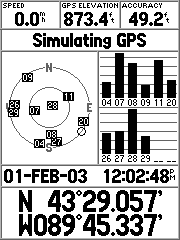 G7toWin
and G7toCE are companion programs that manage
GPS waypoint, track and route files on Windows desktop
or laptop and Pocket PC computers. The programs work
with Garmin, Magellan and Lowrance GPS units. The CE
version is useful for storing GPS data on a PDA, especially
if you want to save data in the field before resetting
a GPS receiver's memory. G7toWin
and G7toCE are companion programs that manage
GPS waypoint, track and route files on Windows desktop
or laptop and Pocket PC computers. The programs work
with Garmin, Magellan and Lowrance GPS units. The CE
version is useful for storing GPS data on a PDA, especially
if you want to save data in the field before resetting
a GPS receiver's memory.
Functions
include the ability to convert GPS tracks to routes/waypoints
and a utility to capture the screen image of your GPS
unit (like the Garmin GPSMAP 76S screen to the left)
to a desktop or laptop PC. Waypoints and tracks can
be saved or converted to various formats used by other
mapping programs like OziExplorer®, Delorme Street Atlas
USA®, Fugawi®, MapTech® and others.
|
|
|

Would you
like to overlay your GPS track, colored for elevations
or speed, on a map or aerial image without installing
any new mapping software or large image databases on
your PC? If so, check out the free, online GPS
Visualizer.
 After
logging on to the GPS Visualizer web site, fill in a
form for the type of map you'd like to create. The background
image can be aerial photos, Landsat imagery, political
maps or a variety of other choices depending where in
the world your GPS data is. You browse to GPS data files
on your hard drive, which will be uploaded to the GPS
Visualizer server where the computing is done. Your
GPS track and waypoint files can be of many common formats
supported by the application. After
logging on to the GPS Visualizer web site, fill in a
form for the type of map you'd like to create. The background
image can be aerial photos, Landsat imagery, political
maps or a variety of other choices depending where in
the world your GPS data is. You browse to GPS data files
on your hard drive, which will be uploaded to the GPS
Visualizer server where the computing is done. Your
GPS track and waypoint files can be of many common formats
supported by the application.
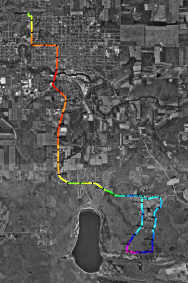
After a
few seconds, GPS Visualizer will return a map similar
to the one on the left (click
for a larger view). The example is colored for elevations
along the travel route, but the application offers nine
choices including speed, slope, and distance. You designate
the size of the image and other display parameters,
which can be saved as an interactive scalable vector
graphic (SVG) or conventional graphic. The utility will
also generate an optional elevation
profile of a GPS track. See the GPS
Visualizer site for details.
|
|
|
|
 Waypoint+
and wayp2shp (Zip file - 3MB) are two free utilities
that, together, can be used to download waypoints, tracks
and routes from Garmin GPS receivers and then convert
the data to shapefiles. The shapefiles can be opened
in mapping programs such as fGIS. Waypoint+
and wayp2shp (Zip file - 3MB) are two free utilities
that, together, can be used to download waypoints, tracks
and routes from Garmin GPS receivers and then convert
the data to shapefiles. The shapefiles can be opened
in mapping programs such as fGIS.
Waypoint+
can save GPS data in a number of formats including Waypoint+,
comma delimited text, Street Atlas and others. It offers
support for over 140 datums.
The wayp2shp
utility works with comma delimited txt files. It
can convert any sort of xy or yx data (not necessarily
just Garmin GPS data) into shapefiles provided the data
fields are arranged in the same order as produced by
Waypoint+ text files. (Only the record number and
label ― up to 12 characters ― are saved
to the shapefile attribute table, but those can be used
to join additional data to the points with utilities
in programs like fGIS.) Program folders for Waypoint+
(by Brent Hildebrand) and wayp2shp (by James R. Taylor)
contain example text files for reference.
|
|
|
|
 GPS
Map Explorer (from Steinar Moen of Norway)
imports digital images as basemaps, which are easily
geo-referenced by identifying lat/lon points on the
image or by dragging a GPS track (such as a road) to
fit its location on the image. Rather than deform map
images to fit a Geographic coordinate system, GPS Map
Explorer takes an original approach by fitting GPS data
to the image. The free program communicates with Garmin
or NMEA format GPS receivers, showing real-time data
and uploading or downloading tracks, waypoints or routes.
Generate graphs showing speed and altitude. Replay tracks
at any speed. An auto-pilot feature can even be configured
to guide a boat. (Many of the GIS
mapping programs in the Digital Grove Toolbox are
good sources of basemaps for GPS Map Explorer.) GPS
Map Explorer (from Steinar Moen of Norway)
imports digital images as basemaps, which are easily
geo-referenced by identifying lat/lon points on the
image or by dragging a GPS track (such as a road) to
fit its location on the image. Rather than deform map
images to fit a Geographic coordinate system, GPS Map
Explorer takes an original approach by fitting GPS data
to the image. The free program communicates with Garmin
or NMEA format GPS receivers, showing real-time data
and uploading or downloading tracks, waypoints or routes.
Generate graphs showing speed and altitude. Replay tracks
at any speed. An auto-pilot feature can even be configured
to guide a boat. (Many of the GIS
mapping programs in the Digital Grove Toolbox are
good sources of basemaps for GPS Map Explorer.)
|
|
|
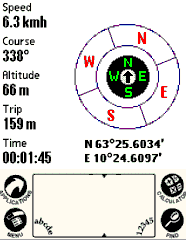
Palm
PDA users will like
Cetus GPS for tracking and field data collection.
Although it doesn't display basemaps, Cetus GPS is an
excellent freeware navigation assistant, location database
manager, track logger and GPS data converter for Palm
devices capable of serial communication with a GPS receiver.
The developer offers tracklog managers for Mac and Linux
PCs.
A companion
program, GPS
TrackData is suggested for Windows PC users.
It will convert Cetus data to a number of formats, with
well-designed
features for text file parameters.
|
|
|
 GeoConv
is an advanced, professional-level tool for GPS users
who need datum transformation, projected coordinate
conversion and volume batch processing. The program
runs as a command-line utility, but the seemingly complex
task of using GeoConv can be managed by preparing batch
files tailor-made for the processes you most frequently
invoke. Developer Eino Uikkanen's documentation is complete
with many examples for reference. GeoConv
is an advanced, professional-level tool for GPS users
who need datum transformation, projected coordinate
conversion and volume batch processing. The program
runs as a command-line utility, but the seemingly complex
task of using GeoConv can be managed by preparing batch
files tailor-made for the processes you most frequently
invoke. Developer Eino Uikkanen's documentation is complete
with many examples for reference.
The
GeoConv freeware utility:
- Converts
between different
- GPS
file utility
types,
e.g. OziExplorer <-> GPX
<-> TXT
- Datums,
e.g. NAD27 <-> WGS84
- Coordinate
formats ,
e.g. Geodetic Lat/Lon <-> UTM
<-> User Defined TM
- Filters
coordinates by setting selection criteria for points
written to the output-file
- Reduces
track-files to routes by removing desired amount
of points from the original track
- Generates
unique waypoint ID's
based on waypoint description and/or old ID
...and more.
For
simple GPS format conversion through an interactive
graphical interface, other utilities on this page might
be easier to use. Also see GPSBabel
and a complementary free GUI called
GPSBabelWrapper if you don't need the reprojection
or other sophisticated functions found in GeoConv.
|
|
|
 Built
with the Google Maps API, Google
APRS displays real-time locations of GPS enabled
Automatic Position Reporting System (APRS) radio transmitters.
If a vehicle, person, child, pet, etc. is carrying a
small APRS transmitter connected to a GPS unit, then
you can visit the Google APRS web site to see where
the target is at the moment. The information sent by
the unit includes lat/lon, speed, bearing, transmitter
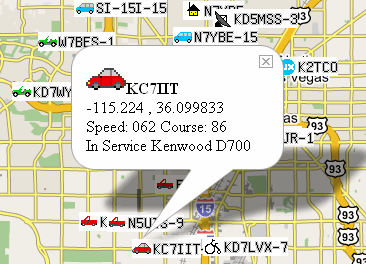
model and a short text message (if desired). Each transmitter
is identified by a call sign as shown in the following
screen shot. The detail in the balloon is called by
clicking on an APRS map icon. Built
with the Google Maps API, Google
APRS displays real-time locations of GPS enabled
Automatic Position Reporting System (APRS) radio transmitters.
If a vehicle, person, child, pet, etc. is carrying a
small APRS transmitter connected to a GPS unit, then
you can visit the Google APRS web site to see where
the target is at the moment. The information sent by
the unit includes lat/lon, speed, bearing, transmitter
model and a short text message (if desired). Each transmitter
is identified by a call sign as shown in the following
screen shot. The detail in the balloon is called by
clicking on an APRS map icon.
APRS
will probably be the next big innovation for consumer
GPS. Conventional GPS shows where you are, but
APRS shows your location to everyone else who knows
your call sign. The system was developed by
Bob
Bruninga in the early 1990's. The "packet
radio" transmissions are picked up and repeated
by a network of amateur radio stations and made available
via the Internet (or you can display location data independent
of the web if you have a HAM radio receiver and PC
or Mac APRS software).
Bob Bruninga
provides an excellent
APRS PowerPoint slide show explaining how it all
works. If you already have a compatible GPS receiver,
the addition of a small
APRS transmitter may cost less than $100 to be operational
via the web. In addition to Google APRS, Java
web applications are available but their base maps
are not as refined as those from Google.
 You
need to be a licensed radio amateur to use an APRS transmitter
on the HAM bands. A simpler alternative for hunters
or campers who want to keep track of their party's members
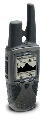
might be a unit like the Garmin
Rhino (models 110 to 530). Rhino units include the
ability to transmit GPS locations to other Rhino users.
Short-range (<2 miles) transmission using Family
Radio Service (FRS) frequencies does not entail the
need for a radio license. The Garmin Rhinos also include
General Mobile Radio Service (GMRS) capability. Garmin
claims the GMRS 520/530 Rhinos are good for communicating
up to fourteen miles without assistance of a repeater,
but using the GMRS frequencies in the U.S. requires
a FCC license. A "family"
FCC license covering multiple GPRS radios costs
$80 per five-year term in the U.S. You
need to be a licensed radio amateur to use an APRS transmitter
on the HAM bands. A simpler alternative for hunters
or campers who want to keep track of their party's members
might be a unit like the Garmin
Rhino (models 110 to 530). Rhino units include the
ability to transmit GPS locations to other Rhino users.
Short-range (<2 miles) transmission using Family
Radio Service (FRS) frequencies does not entail the
need for a radio license. The Garmin Rhinos also include
General Mobile Radio Service (GMRS) capability. Garmin
claims the GMRS 520/530 Rhinos are good for communicating
up to fourteen miles without assistance of a repeater,
but using the GMRS frequencies in the U.S. requires
a FCC license. A "family"
FCC license covering multiple GPRS radios costs
$80 per five-year term in the U.S.
Some cellular
telephones also offer real-time position tracking capabilities
over the Internet, as seen in this example
from AccuTracking. For other options, simple type
"GPS tracking" into Google
search.
|
|
|
 USAPhotoMaps™
retrieves and displays TerraServer aerial photos,
urban photos, topographic maps, elevation data, place
names and USGS landmarks. It is one of the fastest tools
available for navigating to any location in the United
States and collecting TerraServer image tiles for base
maps. Assemble images into single, georeferenced base
maps that can be opened by other geospatial programs
or drawing programs. Use USAPhotoMaps to quickly get
latitude, longitude or UTM coordinates for any position.
GPS waypoints, routes and tracks can be displayed as
map overlays and transferred to or from GPS units. USAPhotoMaps™
retrieves and displays TerraServer aerial photos,
urban photos, topographic maps, elevation data, place
names and USGS landmarks. It is one of the fastest tools
available for navigating to any location in the United
States and collecting TerraServer image tiles for base
maps. Assemble images into single, georeferenced base
maps that can be opened by other geospatial programs
or drawing programs. Use USAPhotoMaps to quickly get
latitude, longitude or UTM coordinates for any position.
GPS waypoints, routes and tracks can be displayed as
map overlays and transferred to or from GPS units.
USAPhotoMaps is available for free download from JDMCox
Software.
Digital Grove offers instructions
for using USAPhotoMaps here.
|
|
Return
to Top /
About
|
|
|
|