|
|
|

TatukGIS
Viewer is a free, powerful utility for quickly browsing
catalogs of GIS data and setting up customized views. It is one
of few viewers that can directly open
US Census TIGER line data without conversion to another format
first.
The
TatukGIS Viewer functionality includes:
- Opens many common spatial
image formats (TIFF/GeoTIFF, ECW, MrSID, SPOT, JPEG, PNG,
BMP, TatukGIS PixelStore, Grid, SDTS DEM)
- Support for a wide range of
vector types (SHP, E00, TAB, MID/MIF, DXF, DGN, TIGER,GML,
GDF, DLG, SDTS, Geomedia®, CADRG, ASCII GRID, FLOAT GRID,
BT, DTED, ADF)
- Reading DXF format styles
(colors, line types, fills, etc.)
- Opening of ArcView®, MapInfo®
and TatuKGIS® projects
- Fast R-tree indexing (enabling
easy manipulation of very large data layers)
- Distance, area, and perimeter
measurement tools
- Presentation of vector attribute
information in table form
- Enhanced Help menu with tutorials
- Provides a print preview and
prints with any Windows printer
For a complete list of features,
visit
TatukGIS
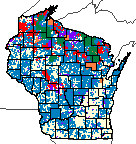 One
of the unique wizards offered by the Viewer includes the ability
to generate thematic maps based on values in GIS data attribute
tables. The example on the left (click for a larger view) is a
thematic map of managed forest land in Wisconsin. The display
colors are based on categories of public and private ownership.
(The thematic wizard is also useful for shading SDTS Digital Elevation
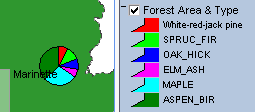
Model data.) The Viewer can generate pie and bar chart map symbols
(as shown below) from attribute data. One
of the unique wizards offered by the Viewer includes the ability
to generate thematic maps based on values in GIS data attribute
tables. The example on the left (click for a larger view) is a
thematic map of managed forest land in Wisconsin. The display
colors are based on categories of public and private ownership.
(The thematic wizard is also useful for shading SDTS Digital Elevation
Model data.) The Viewer can generate pie and bar chart map symbols
(as shown below) from attribute data.
If
you are a resource manager or educator, the TatukGIS Viewer could
help you make the most of map data by sharing it with clients,
students or others.
The
Viewer includes a Wizard that automatically generates the map
display code used by the TatukGIS
Internet Map Server. The TatukGIS website includes examples
showing how a cartographer can design lucid interactive maps to
serve over the Internet to non-technical users. Click the following
image to see:
A
free trial version of TatukGIS IS Lite map server is available
for web developers.
Complete
GIS applications (like fGIS) that expand
upon the Viewer can be built royalty-free with the exceptional
DK (Developer Kernel)
available from TatukGIS.
|
|
|
 dlgv32
Pro, distributed by the USGS, is a limited-feature version of
Global Mapper.
The viewer opens most image and vector map files. It seamlessly
integrates data layers even if projections or scales vary. Open
your first layer in the desired projection, and additional layers
from other projections will be converted to align with the first
"on the fly". Users can select display, turn 3D hill
shading on or off, modify the color scheme, adjust line width
and color, etc. Global Mapper can measure areas and distances,
and it generates a constant readout of the latitude/longitude
coordinates of the cursor. dlgv32
Pro, distributed by the USGS, is a limited-feature version of
Global Mapper.
The viewer opens most image and vector map files. It seamlessly
integrates data layers even if projections or scales vary. Open
your first layer in the desired projection, and additional layers
from other projections will be converted to align with the first
"on the fly". Users can select display, turn 3D hill
shading on or off, modify the color scheme, adjust line width
and color, etc. Global Mapper can measure areas and distances,
and it generates a constant readout of the latitude/longitude
coordinates of the cursor.
|
|
|
|
Natural
Resources Database (NRDB) bridges tabular statistics
with spatial data (points, lines and areas) to create thematic
maps. NRDB and NRDB Pro are database
products which take time and experience to set-up. Their
strength is in the fact that once a database has been developed
it can be redistributed with the software and it is relatively
easy for end users to output information from the database
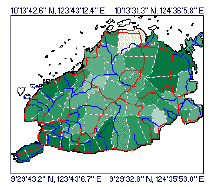
in the form of maps, graphs and reports. As
an example, the NRDB tutorial illustration to the left shows
the annual rainfall of municipalities in a province as different
colors. Use NRDB to:
-
Design and store databases for either spatial or non-spatial
information
-
Import records from Excel, Access and other ODBC compliant
formats and associate them with spatial data
-
Utilize map objects made with other mapping and GIS
programs, downloaded from the Internet, or created with
an included digitizing utility (which geo-references
scanned or downloaded maps and aerial photos that you
can trace over to make shapefiles)
-
Produce reports and graphs from database queries or
generate thematic maps from records linked to spatial
data
|
|
 Richard
D. Alexander, of the U.K., originally produced NRDB for
the Philippine Province of Bohol and now offers the free
program to encourage sustainable management of resources
around the world. His vision for NRDB, FAQs and other useful
information are available at the
NRDB User Group. Richard
D. Alexander, of the U.K., originally produced NRDB for
the Philippine Province of Bohol and now offers the free
program to encourage sustainable management of resources
around the world. His vision for NRDB, FAQs and other useful
information are available at the
NRDB User Group.
Although NRDB can draw map geometry through its digitizing
utility "Image to Shapefile", NRDB's primary strength
is thematic mapping utilizing existing spatial data. Mr.
Alexander recently launched NRDB View, an open source shapefile
viewer and editor that will provide additional map drawing
capabilities as it evolves. If you are a programmer, you
might consider helping with the NRDB
View project.
|
|
|
|
|
|
Utilities
for Image and Vector Data
|
|
|
Image
Registration
FWTools
- Advanced, open source image processing and geo-referencing
tools. Digital Grove offers a tutorial
for using GDALWARP, an image reprojection utility included
in FWTools. The tutorial includes DGWarp ,
a zip file that has GDALWARP and a number of example batch files
that explain how to use it. FWTools, GDAL and OpenEV are a few
of the professional level tools available at: ,
a zip file that has GDALWARP and a number of example batch files
that explain how to use it. FWTools, GDAL and OpenEV are a few
of the professional level tools available at:

A relatively
simple method to geo-reference a
scanned image is available with freeware fGIS and HyperCube.
If you don't
want to spend time figuring out free tools to georeference or
reproject data, consider the registered version of Global
Mapper (possibly the best all-round GIS toolkit available)
or Tatuk's
Aerial Imagery Corrector, which are relatively easy to
use.
|
|
|
|
 HyperCube,
freeware produced by the US Army Corps of Engineers
- Topographic Engineering Center, prepares multi and
hyper-spectral imagery for interpretation and classification
of real world features. The small program (about 700KB
download) includes a host of functions to analyze, filter,
warp, mosaic, reformat, calibrate, and combine images.
It comes as a single "exe" file, which does
not require installation. Just unzip the file and use
it. The program is available for Windows®
and MacOSX®. HyperCube,
freeware produced by the US Army Corps of Engineers
- Topographic Engineering Center, prepares multi and
hyper-spectral imagery for interpretation and classification
of real world features. The small program (about 700KB
download) includes a host of functions to analyze, filter,
warp, mosaic, reformat, calibrate, and combine images.
It comes as a single "exe" file, which does
not require installation. Just unzip the file and use
it. The program is available for Windows®
and MacOSX®.
HyperCube
works with RAW, JPEG, TIFF, TARGA, LAN, Library, Multiband,
NITF, and SRF file formats. Mac users can also access
PICT format images. One idiosyncrasy of the File ->
Open process is that the browser shows all file types
(*.*), but the user must specify the file type to open
from a drop-down list.
HyperCube
is a handy utility to
use with fGIS to rubber-sheet and georeference images.
Its many other uses are well documented in a 163 page
PDF user guide available from the
Topographic Engineering Center, which also offers
sample data sets.
|
|
|
|
|
|
|
|
 ER
Mapper ECW utilities - There are four recommended ECW
programs to download: the ER Viewer, ECW Compressor, ECW Header
Editor and the ECW plug-in for ERDAS ViewFinder, all available
for free from the ER Mapper Internet site. ER
Mapper ECW utilities - There are four recommended ECW
programs to download: the ER Viewer, ECW Compressor, ECW Header
Editor and the ECW plug-in for ERDAS ViewFinder, all available
for free from the ER Mapper Internet site.
ECW
stands for "Enhanced
Compressed Wavelet". It's a popular file compression
format used for GIS imagery. (MrSID from
Lizardtech is another.) ECW can reduce the size of a file
twenty or more times without perceptible loss in image quality.
|
|
|
GeoTiff
Examiner is a handy utility that can
embed the contents of a geo-referenced image's "world coordinate
file" into the header of a TIFF image file.
|
|
|
TatukGIS®
offers a free
Datums & Projections Coordinate Calculator™. It converts
geographic coordinates of a point from one system to another,
supporting 24 of the most common projections and 225 datums. See
Joe and Jack's
Gpsinformation.net for instructions.
Tatuk's
Aerial Imagery Corrector®, which features geo-referencing
and removal of distortion from aerial photographs, is available
as a free 30-day trial. The program's help file is an excellent
tutorial on photo rectification.
|
|
|
|
|
|
|
|
|
|
DXF2XYZ
from Guthrie CAD/GIS of Australia extracts the xyz coordinates
from DXF files (a CAD vector format), handy for building data
tables for surface plotting programs like SurGe. See the SurGe
tutorial for an example.
In
conjunction with DXF2XYZ, the Massachusetts
DXF Author lets you create a DXF file from shapefiles.
That means you can use a program like fGIS to place place your
data points as shapefiles, which can be converted to DXF, which
in turn can be converted to XYZ text files for data girding programs.
|
|
|
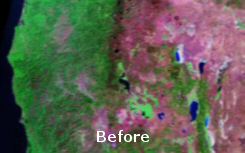
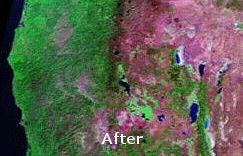
Image
Analyzer from MeeSoft of Denmark is not a typical photo
program. It offers unique "deconvolution" filters that
correct blurred images (see aerial example below). In addition
to traditional picture enhancement tools, Image Analyzer features
advanced operations for examining and adjusting imagery.
MeeSoft also produces
a simple "Diagram Designer"
that easily annotates maps and photos. Both programs are distributed
free.
|
|
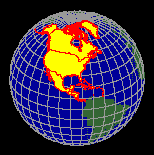 |
Xatellite from Shale Software in the Netherlands
displays shapefiles on a 3D globe. The shapefiles must
be in the Geographic lat/lon coordinate system, easy
to find through a Google search.
TGlobe
offers a freeware Map
Builder Application that displays geographic
vector data and spatial imagery on a rotating globe.
You might also want to see the
Motherplanet Earth Explorer, a rotating 3D Earth
educational tool based on 1 km resolution satellite
imagery and digital elevation models. It's a commercial
application made with TGlobe.
|
|
|
|
Non-Spatial
Map Drawing Software
|
|
|
|
|
|
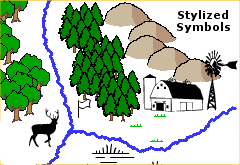
Drawing programs
can take advantage of mapping
symbol fonts (like those to the left) that are freely available
on the Internet. One of the advantages of trying free viewers
from professional GIS companies (like ESRI, ERDAS, MapInfo, MapTech,
etc.) is that they install many of their symbol fonts into your
Windows font folder, giving you the opportunity to explore them.
|
|
|
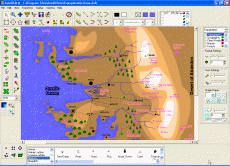 AutoREALM™
is a free GNU,
open source mapping program. It's a vector drawing program designed
specifically for making maps. Most operations like selecting line
types and mapping symbols or drawing areas are uncomplicated.
AutoRealm can load raster images (like aerial photos from TerraServer,
USGS topo maps or screen captures from Global Mapper) as backgrounds
over which you can trace features, add symbols or write text. AutoREALM™
is a free GNU,
open source mapping program. It's a vector drawing program designed
specifically for making maps. Most operations like selecting line
types and mapping symbols or drawing areas are uncomplicated.
AutoRealm can load raster images (like aerial photos from TerraServer,
USGS topo maps or screen captures from Global Mapper) as backgrounds
over which you can trace features, add symbols or write text.
AutoRealm
works well for making stand-alone resource management maps that
are not part of a geospatial framework. Since the program is also
used to create maps for role-playing games, it has some unusual
symbol libraries specific for gaming. You can make maps that might
appear to come straight from Tolkien's Hobbit or more formal,
technical map drawings. The choice is yours. Depending on the
purpose, stylized maps can be informative and interesting.
The
program can export image and vector files for use in other programs.
Although images in AutoRealm are not geo-referenced, complementary
mapping programs like Map Maker Gratis, 3DEM or OziExplorer can
register the images if you know the latitude/longitude of a couple
points on the map.
|
|
|
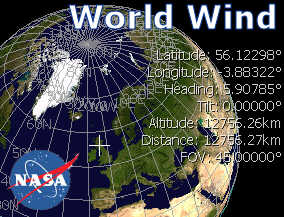 Ever
dream of flying effortlessly around the Earth through mountain
valleys and over farmlands, deserts or cities? If you are fortunate
to have a robust PC (1 GHz P3 or better) with a good
3D video card and cable Internet connection, you can experience
something similar. NASA's World Wind amazes not only with seamless
integration of elevation data, satellite imagery and a vast collection
of remote sensing data but most dramatically with its motion.
Still
images cannot fully convey the feeling of World Wind. Ever
dream of flying effortlessly around the Earth through mountain
valleys and over farmlands, deserts or cities? If you are fortunate
to have a robust PC (1 GHz P3 or better) with a good
3D video card and cable Internet connection, you can experience
something similar. NASA's World Wind amazes not only with seamless
integration of elevation data, satellite imagery and a vast collection
of remote sensing data but most dramatically with its motion.
Still
images cannot fully convey the feeling of World Wind.
The World Wind download
can be a challenge. At 170 MB for the main program and another
6.4 MB for the newest version update, expect a slow retrieval
from overtaxed servers (don't even try if you are on dial-up).
Once installed including a special Direct X Managed Code component,
operation is straightforward with mouse
or keyboard commands. The large installation file includes
NASA's Blue Marble Earth imagery. Additional data is acquired
on demand based on the layers you specify and cached on your PC
for future use. More information and the free program are available
from NASA.
See the
World Wind Central Wiki for current developments, plug-ins
and more.
|
|
|
 Not
to be outdone, Google has its own 3D Earth viewer, Google Earth.
And beautiful it is. DigitalGlobe®, other recent color imagery
and even 3D buildings are combined in a fly-anywhere virtual world.
You can selectively turn on infrastructure layers including roads,
stores, schools, etc. Like World Wind, Google Earth will only
run on relatively new PCs with good video and broadband Internet.
The free version is cool (about a 10 MB download), but for $20
(annual subscription) you can get a plus upgrade that allows you
to add your own data or annotations, and it offers higher image
resolution. Not
to be outdone, Google has its own 3D Earth viewer, Google Earth.
And beautiful it is. DigitalGlobe®, other recent color imagery
and even 3D buildings are combined in a fly-anywhere virtual world.
You can selectively turn on infrastructure layers including roads,
stores, schools, etc. Like World Wind, Google Earth will only
run on relatively new PCs with good video and broadband Internet.
The free version is cool (about a 10 MB download), but for $20
(annual subscription) you can get a plus upgrade that allows you
to add your own data or annotations, and it offers higher image
resolution.
Also, if you haven't
discovered that Google has added color 2-meter resolution color
aerial imagery to its regular maps, take a look at
Google Satellite Maps. US coverage is selective, but very
nice if your area of interest is included.
|
|
|
|
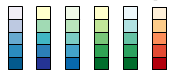 |
Need help
selecting a color scheme for a map? Try the on-line
Color Brewer from Penn State's Geography Professor
Cynthia Brewer. The application explains the merits of
sequential, diverging and qualitative legend types. You
can select from a variety pre-formulated color schemes
and then see them applied on a sample map. You can then
save the color values for use in mapping or illustration
programs. |
|
|
|
Miscellaneous
Utilities
|

Sun
Clock is an excellent world time clock from the developer
of Map Maker.
|
|
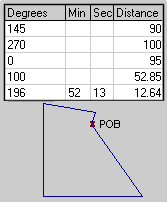 |
MapDraw™
(376 KB) plots property boundaries from metes and bounds descriptions
found in deeds. It's a lot easier than pulling out a protractor,
ruler and calculator to draw out a tract. The program handles
curves, automatic closures, acreage and perimeter calculations,
print scaling, multiple lots, imperial or metric measurements,
etc. MapDraw 2.7 is shareware providing both azimuth (360°) and
bearing versions. The program will save a BMP image of the plot,
but it is not geo-referenced. (See a simple geo-referencing technique
here.)
Informatik,
Inc. also offers a newer time-limited trial, now called Mapdraw
Deed Plotter 6.2 (2.3MB).
|
|
|
|
|
 |
A
good screen capture program is often valuable in mapping projects.
Gadwin
Print Screen™ works well, with a simple interface and
small memory usage.
|
|
|
Virtual Printer
 Virtual
Printer works like any printer under MS Windows® -
but without wasting paper. Using Virtual Printer, you'll get your
map printouts as a collection of Enhanced Metafiles that you can
view, store, modify, and print with other applications. Install
it like a common Windows Printer using the Printer Wizard, print
like on a common printer. There are printer drivers for all major
Windows versions. Virtual
Printer works like any printer under MS Windows® -
but without wasting paper. Using Virtual Printer, you'll get your
map printouts as a collection of Enhanced Metafiles that you can
view, store, modify, and print with other applications. Install
it like a common Windows Printer using the Printer Wizard, print
like on a common printer. There are printer drivers for all major
Windows versions.
|
Return
to Top |
|
|